



AI 开发趣味登录页:会偷看的小猫 + 互动几何人物,手把手教你打造

大额流量卡 全国0元包邮
高速稳定 · 即插即用 · 省心好用
点击了解

登录页面的互动效果

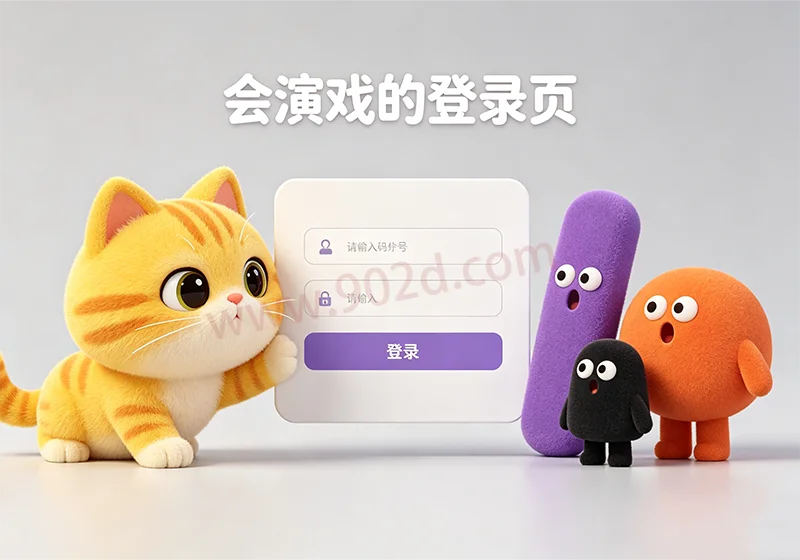
鼠标在左侧小猫区域移动时,小猫和三个几何人物的眼睛会跟随鼠标转动。
输入用户名时,小猫会伸长脖子偷看,三个几何人物会呈现吃惊的表情(嘴巴变圆)。
输入密码时,小猫和几何人物会 “避嫌”,恢复到原来的状态。
文章末尾有成品展示

图片[1]-AI 开发趣味登录页:会偷看的小猫 + 互动几何人物,手把手教你打造同款 VibeCoding 登录界面

开发步骤

步骤 1:准备 AI 编程工具

输入以下提示词:

请编写一个登录页面,分为左右两个部分。左侧绘制一只黄色的小猫,风格卡通可爱;右侧包含登录信息区域,有用户名输入框、密码输入框和蓝色的登录按钮。要求从专业 UI 设计角度,确保页面美观、布局合理,使用 HTML、CSS 和 JavaScript 实现。

发送后,AI 会生成基础的登录页代码,将其保存为login.html,用浏览器打开即可看到初始效果(此时小猫眼睛是静态的)。

步骤 2:添加小猫眼睛跟随鼠标的效果

输入提示词:

为登录页左侧的黄色小猫添加交互效果:当鼠标在页面左侧小猫所在区域移动时,小猫的眼睛要跟随鼠标移动,眼睛移动速度与鼠标移动速度匹配,效果自然流畅。请修改代码实现该功能,如需引入额外库请说明。

AI 会在原有代码基础上添加 JavaScript 逻辑,实现眼睛跟随效果。保存后刷新浏览器,即可看到小猫眼睛跟随鼠标转动。

步骤 3:添加小猫偷看用户名、几何人物吃惊的效果

输入提示词:

为登录页添加以下交互:当用户点击并输入用户名时,左侧黄色小猫的眼睛看向用户名输入框,脖子向输入框方向拉长,呈现 “偷看” 效果;同时左侧的三个几何形状人物(分别为紫色长条、黑色小个、橘色圆胖,与小猫同水平线且不遮挡)要呈现吃惊的表情(嘴巴变圆)。当鼠标离开用户名输入框时,小猫和几何人物恢复原状态。请修改代码实现。

AI 会继续完善代码,添加这些交互逻辑。

步骤 4:添加几何人物眼睛跟随鼠标的效果

输入提示词:

让左侧的三个几何人物(紫色长条、黑色小个、橘色圆胖)的眼睛也跟随鼠标移动,与小猫眼睛的跟随效果一致,营造出它们也在 “盯着” 鼠标的感觉。请修改代码实现。

步骤 5:调整细节(如几何人物位置、样式)

如果对几何人物的位置、嘴巴颜色、眼睛样式不满意,可继续发送提示词,例如:

将三个几何人物分散开,橘色圆胖人物适当左移,黑色和紫色人物适当右移;将它们的嘴巴改为白色;把橘色圆胖人物的眼睛样式调整为和紫色人物一样。请修改代码。

通过不断细化提示词,就能逐步实现和趣味登录页啦!

成品模板代码 :

<!DOCTYPE html>
<html lang="zh-CN">
<head>
    <meta charset="UTF-8">
    <meta name="viewport" content="width=device-width, initial-scale=1.0">
    <title>🐱 集体盯梢 · 登录页</title>
    <link rel="preconnect" href="https://fonts.googleapis.com">
    <link rel="preconnect" href="https://fonts.gstatic.com" crossorigin>
    <link href="https://fonts.googleapis.com/css2?family=Quicksand:wght@400;600;700&display=swap" rel="stylesheet">
    <style>
        * {
            margin: 0;
            padding: 0;
            box-sizing: border-box;
        }

        body {
            font-family: 'Quicksand', sans-serif;
            min-height: 100vh;
            display: flex;
            align-items: center;
            justify-content: center;
            background: linear-gradient(145deg, #f9f3e6 0%, #ffe9d4 100%);
            padding: 1.5rem;
        }

        .login-card {
            display: flex;
            flex-direction: row;
            max-width: 1000px;
            width: 100%;
            background: rgba(255, 250, 240, 0.70);
            backdrop-filter: blur(4px);
            -webkit-backdrop-filter: blur(4px);
            border-radius: 56px;
            box-shadow: 0 25px 50px -12px rgba(0, 0, 0, 0.25), 
                        inset 0 1px 3px rgba(255, 255, 255, 0.6);
            overflow: hidden;
            transition: all 0.2s ease;
        }

        .left-panel {
            flex: 1.1;
            background: #fef7e9;
            background-image: radial-gradient(circle at 20% 30%, #fff6e0 0%, #fcebd5 100%);
            display: flex;
            align-items: center;
            justify-content: center;
            padding: 2rem 1.5rem;
            min-height: 380px;
            position: relative;
            cursor: default;
        }

        .scene-wrapper {
            width: 100%;
            max-width: 320px;
            aspect-ratio: 1 / 1;
            display: flex;
            align-items: center;
            justify-content: center;
            position: relative;
        }

        .scene-svg {
            width: 100%;
            height: auto;
            display: block;
            filter: drop-shadow(0 12px 18px rgba(200, 140, 60, 0.25));
            transition: transform 0.3s ease;
        }

        .scene-svg:hover {
            transform: scale(1.02) rotate(-2deg);
        }

        .right-panel {
            flex: 1;
            background: rgba(255, 248, 235, 0.6);
            backdrop-filter: blur(2px);
            -webkit-backdrop-filter: blur(2px);
            padding: 2.8rem 2.5rem;
            display: flex;
            flex-direction: column;
            justify-content: center;
            border-left: 1px solid rgba(255, 215, 150, 0.3);
        }

        .login-header {
            margin-bottom: 2rem;
        }

        .login-header h2 {
            font-weight: 700;
            font-size: 2rem;
            letter-spacing: -0.5px;
            color: #3d2a1b;
            display: flex;
            align-items: center;
            gap: 0.5rem;
        }

        .login-header h2 span {
            background: #f7d44a;
            padding: 0.2rem 0.8rem;
            border-radius: 60px;
            font-size: 1.2rem;
            line-height: 1.4;
            color: #3d2a1b;
            box-shadow: inset 0 -3px 0 #dbaa2a;
        }

        .login-header p {
            color: #7a5f42;
            font-weight: 400;
            font-size: 0.95rem;
            margin-top: 6px;
            letter-spacing: 0.3px;
        }

        .input-group {
            margin-bottom: 1.5rem;
        }

        .input-group label {
            display: block;
            font-weight: 600;
            font-size: 0.85rem;
            color: #5f432b;
            margin-bottom: 0.4rem;
            letter-spacing: 0.5px;
            text-transform: uppercase;
        }

        .input-field {
            width: 100%;
            padding: 0.9rem 1.2rem;
            font-size: 1rem;
            font-family: 'Quicksand', sans-serif;
            background: white;
            border: 2px solid #f0dcc8;
            border-radius: 40px;
            outline: none;
            transition: all 0.25s ease;
            color: #2b1b0f;
            font-weight: 500;
            box-shadow: 0 2px 6px rgba(0,0,0,0.02);
        }

        .input-field:focus {
            border-color: #f5b84b;
            box-shadow: 0 0 0 6px rgba(245, 184, 75, 0.15);
            background: #fffdf9;
        }

        .input-field::placeholder {
            color: #c0a68a;
            font-weight: 400;
            opacity: 0.7;
        }

        .btn-login {
            width: 100%;
            padding: 0.9rem 1.8rem;
            background: #4a8af4;
            background: linear-gradient(145deg, #3f7fe0, #2d6bcb);
            border: none;
            border-radius: 60px;
            color: white;
            font-weight: 700;
            font-size: 1.2rem;
            font-family: 'Quicksand', sans-serif;
            letter-spacing: 0.8px;
            box-shadow: 0 12px 20px -8px rgba(45, 107, 203, 0.35);
            cursor: pointer;
            transition: all 0.2s ease;
            margin-top: 0.5rem;
            display: flex;
            align-items: center;
            justify-content: center;
            gap: 8px;
            border: 1px solid rgba(255, 255, 255, 0.2);
        }

        .btn-login:hover {
            background: linear-gradient(145deg, #3a72d4, #1f5bb8);
            transform: scale(1.01) translateY(-2px);
            box-shadow: 0 18px 28px -10px #2d6bcb;
        }

        .btn-login:active {
            transform: scale(0.96);
            box-shadow: 0 6px 12px -6px #1f4f9e;
        }

        .login-footnote {
            margin-top: 1.8rem;
            font-size: 0.8rem;
            color: #a58364;
            text-align: center;
            border-top: 1px dashed #ecdac8;
            padding-top: 1.2rem;
            letter-spacing: 0.2px;
        }

        .login-footnote a {
            color: #4a8af4;
            font-weight: 600;
            text-decoration: none;
            border-bottom: 1px dotted transparent;
            transition: border 0.2s;
        }

        .login-footnote a:hover {
            border-bottom: 1px dotted #4a8af4;
        }

        @media (max-width: 700px) {
            .login-card {
                flex-direction: column;
                border-radius: 40px;
                max-width: 420px;
            }
            .left-panel {
                padding: 1.5rem 1rem 0.5rem;
                min-height: 240px;
                border-radius: 40px 40px 0 0;
            }
            .scene-wrapper {
                max-width: 180px;
            }
            .right-panel {
                border-left: none;
                border-top: 1px solid rgba(255, 215, 150, 0.3);
                padding: 2rem 1.8rem;
            }
            .login-header h2 {
                font-size: 1.7rem;
            }
        }

        @media (max-width: 480px) {
            .right-panel {
                padding: 1.8rem 1.2rem;
            }
            .input-field {
                padding: 0.8rem 1rem;
                font-size: 0.95rem;
            }
            .btn-login {
                font-size: 1rem;
                padding: 0.8rem 1.2rem;
            }
        }

        @keyframes shake {
            0%, 100% { transform: translateX(0); }
            25% { transform: translateX(-8px); }
            75% { transform: translateX(8px); }
        }
    </style>
</head>
<body>

<div class="login-card">
  
    <!-- 左侧:场景 -->
    <div class="left-panel" id="catContainer">
        <div class="scene-wrapper">
            <svg class="scene-svg" viewBox="0 0 320 280" fill="none" xmlns="http://www.w3.org/2000/svg" id="sceneSvg">
                <!-- 背景小装饰 -->
                <circle cx="40" cy="30" r="6" fill="#FADB9F" opacity="0.4" />
                <circle cx="290" cy="40" r="8" fill="#FADB9F" opacity="0.3" />
                <circle cx="30" cy="230" r="10" fill="#FADB9F" opacity="0.25" />
                <circle cx="300" cy="220" r="7" fill="#FADB9F" opacity="0.3" />
                <circle cx="160" cy="20" r="5" fill="#FADB9F" opacity="0.2" />

                <!-- ===== 三个几何人物 (重新调整位置) ===== -->
                <!-- 1. 紫色长条 (适当右移) 原 translate(40, 140) -> 现 (70, 140) -->
                <g id="geo1" transform="translate(70, 140)">
                    <rect x="0" y="0" width="22" height="60" rx="8" fill="#8B5CF6" stroke="#6D28D9" stroke-width="2" />
                    <!-- 眼睛 (眼白固定) -->
                    <circle id="geo1-eye1" cx="7" cy="18" r="4" fill="white" stroke="#4C1D95" stroke-width="1.5" />
                    <circle id="geo1-eye2" cx="15" cy="18" r="4" fill="white" stroke="#4C1D95" stroke-width="1.5" />
                    <!-- 瞳孔 -->
                    <circle id="geo1-pupil1" cx="7" cy="18" r="2" fill="#4C1D95" />
                    <circle id="geo1-pupil2" cx="15" cy="18" r="2" fill="#4C1D95" />
                    <!-- 嘴巴 (改为白色) -->
                    <path id="geo1-mouth" d="M6 32 Q11 38 16 32" stroke="white" stroke-width="2.5" stroke-linecap="round" fill="none" />
                </g>

                <!-- 2. 黑色小个 (适当右移) 原 translate(95, 150) -> 现 (120, 150) -->
                <g id="geo2" transform="translate(120, 150)">
                    <circle cx="18" cy="18" r="18" fill="#1F2937" stroke="#111827" stroke-width="2" />
                    <circle id="geo2-eye1" cx="10" cy="14" r="5" fill="white" stroke="#111827" stroke-width="1.5" />
                    <circle id="geo2-eye2" cx="26" cy="14" r="5" fill="white" stroke="#111827" stroke-width="1.5" />
                    <circle id="geo2-pupil1" cx="10" cy="14" r="2.5" fill="#111827" />
                    <circle id="geo2-pupil2" cx="26" cy="14" r="2.5" fill="#111827" />
                    <!-- 嘴巴 (改为白色) -->
                    <path id="geo2-mouth" d="M10 28 Q18 34 26 28" stroke="white" stroke-width="2.5" stroke-linecap="round" fill="none" />
                </g>

                <!-- 3. 橘色圆胖 (适当左移) 原 translate(230, 130) -> 现 (205, 130) -->
                <g id="geo3" transform="translate(205, 130)">
                    <ellipse cx="30" cy="35" rx="28" ry="34" fill="#FB923C" stroke="#EA580C" stroke-width="2.5" />
                    <!-- 眼睛样式调整为和紫色人物一样 (眼白大小、边框颜色调整) -->
                    <circle id="geo3-eye1" cx="18" cy="28" r="4" fill="white" stroke="#4C1D95" stroke-width="1.5" />
                    <circle id="geo3-eye2" cx="42" cy="28" r="4" fill="white" stroke="#4C1D95" stroke-width="1.5" />
                    <!-- 瞳孔 (颜色与紫色人物一致) -->
                    <circle id="geo3-pupil1" cx="18" cy="28" r="2" fill="#4C1D95" />
                    <circle id="geo3-pupil2" cx="42" cy="28" r="2" fill="#4C1D95" />
                    <!-- 嘴巴 (改为白色) -->
                    <path id="geo3-mouth" d="M20 48 Q30 56 40 48" stroke="white" stroke-width="2.5" stroke-linecap="round" fill="none" />
                </g>

                <!-- ===== 小猫 ===== -->
                <g id="catGroup">
                    <ellipse cx="180" cy="160" rx="48" ry="44" fill="#FCD34D" stroke="#E5B83C" stroke-width="3" />
                    <ellipse cx="180" cy="172" rx="28" ry="26" fill="#FFE380" opacity="0.7" />
                    
                    <path d="M140 124 L128 82 L158 112 L140 124Z" fill="#FCD34D" stroke="#E5B83C" stroke-width="3" stroke-linejoin="round" />
                    <path d="M220 124 L232 82 L202 112 L220 124Z" fill="#FCD34D" stroke="#E5B83C" stroke-width="3" stroke-linejoin="round" />
                    
                    <path d="M142 118 L134 92 L154 112 L142 118Z" fill="#F9A8A8" stroke="#E88282" stroke-width="1.5" opacity="0.8" />
                    <path d="M218 118 L226 92 L206 112 L218 118Z" fill="#F9A8A8" stroke="#E88282" stroke-width="1.5" opacity="0.8" />
                    
                    <line x1="138" y1="146" x2="108" y2="138" stroke="#9C7A4A" stroke-width="2.5" stroke-linecap="round" />
                    <line x1="136" y1="156" x2="102" y2="156" stroke="#9C7A4A" stroke-width="2.5" stroke-linecap="round" />
                    <line x1="138" y1="166" x2="110" y2="174" stroke="#9C7A4A" stroke-width="2.5" stroke-linecap="round" />
                    <line x1="222" y1="146" x2="252" y2="138" stroke="#9C7A4A" stroke-width="2.5" stroke-linecap="round" />
                    <line x1="224" y1="156" x2="258" y2="156" stroke="#9C7A4A" stroke-width="2.5" stroke-linecap="round" />
                    <line x1="222" y1="166" x2="250" y2="174" stroke="#9C7A4A" stroke-width="2.5" stroke-linecap="round" />
                    
                    <circle cx="158" cy="144" r="13" fill="#FFFDF5" stroke="#4B3A2A" stroke-width="2.5" />
                    <circle cx="202" cy="144" r="13" fill="#FFFDF5" stroke="#4B3A2A" stroke-width="2.5" />
                    
                    <g id="leftEyeGroup">
                        <circle id="leftPupil" cx="162" cy="144" r="7" fill="#2F2216" />
                        <circle id="leftHighlight1" cx="165" cy="140" r="3" fill="white" />
                        <circle id="leftHighlight2" cx="159" cy="148" r="1.5" fill="white" opacity="0.7" />
                    </g>
                    <g id="rightEyeGroup">
                        <circle id="rightPupil" cx="198" cy="144" r="7" fill="#2F2216" />
                        <circle id="rightHighlight1" cx="201" cy="140" r="3" fill="white" />
                        <circle id="rightHighlight2" cx="195" cy="148" r="1.5" fill="white" opacity="0.7" />
                    </g>
                    
                    <path d="M176 164 L184 164 L180 172 L176 164Z" fill="#F472B6" stroke="#DB2777" stroke-width="1.5" stroke-linejoin="round" />
                    <path id="catMouth" d="M171 176 Q180 184 180 176 Q180 184 189 176" stroke="#7A5C3A" stroke-width="2.5" fill="none" stroke-linecap="round" />
                    
                    <ellipse cx="146" cy="168" rx="10" ry="6" fill="#FCA5A5" opacity="0.3" />
                    <ellipse cx="214" cy="168" rx="10" ry="6" fill="#FCA5A5" opacity="0.3" />
                    
                    <ellipse cx="150" cy="200" rx="10" ry="7" fill="#FCD34D" stroke="#E5B83C" stroke-width="2" />
                    <ellipse cx="210" cy="200" rx="10" ry="7" fill="#FCD34D" stroke="#E5B83C" stroke-width="2" />
                    <circle cx="148" cy="202" r="3" fill="#FAD1A0" />
                    <circle cx="212" cy="202" r="3" fill="#FAD1A0" />
                    
                    <path d="M224 188 Q250 180 248 160 Q246 145 232 144" stroke="#E5B83C" stroke-width="7" fill="none" stroke-linecap="round" />
                    <path d="M224 188 Q250 180 248 160 Q246 145 232 144" stroke="#FCD34D" stroke-width="4" fill="none" stroke-linecap="round" />
                    
                    <g transform="translate(200, 88)">
                        <path d="M0 0 L-12 -8 L-8 4 L0 0Z" fill="#F472B6" />
                        <path d="M0 0 L12 -8 L8 4 L0 0Z" fill="#F472B6" />
                        <circle cx="0" cy="0" r="4" fill="#EC4899" />
                    </g>
                </g>

                <!-- 脖子 -->
                <g id="neckGroup">
                    <ellipse id="neckShape" cx="180" cy="120" rx="18" ry="10" fill="#FCD34D" stroke="#E5B83C" stroke-width="2.5" />
                </g>
            </svg>
        </div>
    </div>
  
    <!-- 右侧:登录 -->
    <div class="right-panel">
        <div class="login-header">
            <h2>
                <span>🐱</span> 欢迎回来
            </h2>
            <p>鼠标移动,大家一起盯着你 👀</p>
        </div>
        
        <form id="loginForm" autocomplete="off">
            <div class="input-group">
                <label for="username">用户名</label>
                <input type="text" id="username" class="input-field" placeholder="例如: Kitty" required>
            </div>
            
            <div class="input-group">
                <label for="password">密码</label>
                <input type="password" id="password" class="input-field" placeholder="••••••••" required>
            </div>
            
            <button type="submit" class="btn-login" id="loginBtn">
                <span>登录</span>
                <span style="font-size: 1.3rem; line-height: 1;">→</span>
            </button>
        </form>
        
        <div class="login-footnote">
            测试账号:<strong>cat</strong>  / 密码 <strong>123456</strong> 
            <span style="margin:0 4px;">·</span> 
            <a href="#" onclick="alert('🐱 喵~ 找回密码请发送邮件到 kitty@example.com')">忘记密码?</a>
        </div>
    </div>
</div>

<script>
    (function() {
        // ============================================================
        // 1. 获取所有需要操作的元素
        // ============================================================
        const catContainer = document.getElementById('catContainer');
        
        // ---- 小猫眼睛 ----
        const leftPupil = document.getElementById('leftPupil');
        const rightPupil = document.getElementById('rightPupil');
        const leftHighlight1 = document.getElementById('leftHighlight1');
        const rightHighlight1 = document.getElementById('rightHighlight1');
        const leftHighlight2 = document.getElementById('leftHighlight2');
        const rightHighlight2 = document.getElementById('rightHighlight2');
        
        // ---- 小猫脖子 & 嘴巴 ----
        const neckShape = document.getElementById('neckShape');
        const catMouth = document.getElementById('catMouth');
        
        // ---- 几何人物的瞳孔 ----
        const geoPupils = [
            document.getElementById('geo1-pupil1'),
            document.getElementById('geo1-pupil2'),
            document.getElementById('geo2-pupil1'),
            document.getElementById('geo2-pupil2'),
            document.getElementById('geo3-pupil1'),
            document.getElementById('geo3-pupil2')
        ];
        
        // ---- 几何人物的嘴巴 ----
        const geoMouths = [
            document.getElementById('geo1-mouth'),
            document.getElementById('geo2-mouth'),
            document.getElementById('geo3-mouth')
        ];
        
        // ---- 存储原始状态 ----
        const originalMouths = {
            cat: catMouth.getAttribute('d'),
            geo1: geoMouths[0].getAttribute('d'),
            geo2: geoMouths[1].getAttribute('d'),
            geo3: geoMouths[2].getAttribute('d')
        };
        const originalPupilRadii = geoPupils.map(p => p.getAttribute('r'));
        
        // ============================================================
        // 2. 眼睛跟随鼠标 (所有角色)
        // ============================================================
        const eyeBases = {
            catLeft:  { cx: 158, cy: 144, maxOffset: 6 },
            catRight: { cx: 202, cy: 144, maxOffset: 6 },
            geo1Left:  { cx: 7, cy: 18, maxOffset: 3 },
            geo1Right: { cx: 15, cy: 18, maxOffset: 3 },
            geo2Left:  { cx: 10, cy: 14, maxOffset: 4 },
            geo2Right: { cx: 26, cy: 14, maxOffset: 4 },
            geo3Left:  { cx: 18, cy: 28, maxOffset: 3 },  // 与紫色人物一致
            geo3Right: { cx: 42, cy: 28, maxOffset: 3 }
        };
        
        const pupilMappings = [
            { el: leftPupil, base: eyeBases.catLeft, highlight: leftHighlight1, h2: leftHighlight2 },
            { el: rightPupil, base: eyeBases.catRight, highlight: rightHighlight1, h2: rightHighlight2 },
            { el: geoPupils[0], base: eyeBases.geo1Left },
            { el: geoPupils[1], base: eyeBases.geo1Right },
            { el: geoPupils[2], base: eyeBases.geo2Left },
            { el: geoPupils[3], base: eyeBases.geo2Right },
            { el: geoPupils[4], base: eyeBases.geo3Left },
            { el: geoPupils[5], base: eyeBases.geo3Right }
        ];
        
        const highlightMappings = [
            { el: leftHighlight1, base: eyeBases.catLeft, offsetFactor: 0.6 },
            { el: rightHighlight1, base: eyeBases.catRight, offsetFactor: 0.6 },
            { el: leftHighlight2, base: eyeBases.catLeft, offsetFactor: 0.5 },
            { el: rightHighlight2, base: eyeBases.catRight, offsetFactor: 0.5 }
        ];
        
        let currentDx = 0, currentDy = 0;
        let animationFrameId = null;
        
        // 存储高光初始位置
        function initHighlights() {
            highlightMappings.forEach(({ el }) => {
                if (!el._origCx) {
                    el._origCx = parseFloat(el.getAttribute('cx'));
                    el._origCy = parseFloat(el.getAttribute('cy'));
                }
            });
        }
        
        function updateAllPupils(dx, dy, peekOffsetX = 0, peekOffsetY = 0) {
            const clampedDx = Math.min(1, Math.max(-1, dx));
            const clampedDy = Math.min(1, Math.max(-1, dy));
            currentDx = clampedDx;
            currentDy = clampedDy;
            
            pupilMappings.forEach(({ el, base }) => {
                let extraX = 0, extraY = 0;
                if (el === leftPupil || el === rightPupil) {
                    extraX = peekOffsetX;
                    extraY = peekOffsetY;
                }
                const offsetX = clampedDx * base.maxOffset + extraX;
                const offsetY = clampedDy * base.maxOffset + extraY;
                el.setAttribute('cx', base.cx + offsetX);
                el.setAttribute('cy', base.cy + offsetY);
            });
            
            highlightMappings.forEach(({ el, base, offsetFactor }) => {
                let extraX = 0, extraY = 0;
                if (el === leftHighlight1 || el === rightHighlight1 || el === leftHighlight2 || el === rightHighlight2) {
                    extraX = peekOffsetX * 0.6;
                    extraY = peekOffsetY * 0.6;
                }
                const offsetX = clampedDx * base.maxOffset * offsetFactor + extraX;
                const offsetY = clampedDy * base.maxOffset * offsetFactor + extraY;
                if (!el._origCx) {
                    el._origCx = parseFloat(el.getAttribute('cx'));
                    el._origCy = parseFloat(el.getAttribute('cy'));
                }
                el.setAttribute('cx', el._origCx + offsetX);
                el.setAttribute('cy', el._origCy + offsetY);
            });
        }
        
        // 鼠标事件
        function handleMouseMove(event) {
            const rect = catContainer.getBoundingClientRect();
            const mouseX = (event.clientX - rect.left) / rect.width;
            const mouseY = (event.clientY - rect.top) / rect.height;
            const dx = (mouseX - 0.5) * 2;
            const dy = (mouseY - 0.5) * 2;
            
            if (animationFrameId) {
                cancelAnimationFrame(animationFrameId);
            }
            animationFrameId = requestAnimationFrame(() => {
                // 使用当前的 peek 偏移 (如果有)
                const peekX = window._peekOffsetX || 0;
                const peekY = window._peekOffsetY || 0;
                updateAllPupils(dx, dy, peekX, peekY);
                animationFrameId = null;
            });
        }
        
        function handleMouseLeave() {
            let startTime = null;
            const startDx = currentDx;
            const startDy = currentDy;
            const duration = 200;
            
            function animateReturn(timestamp) {
                if (!startTime) startTime = timestamp;
                const progress = Math.min((timestamp - startTime) / duration, 1);
                const ease = 1 - (1 - progress) * (1 - progress);
                const dx = startDx * (1 - ease);
                const dy = startDy * (1 - ease);
                const peekX = window._peekOffsetX || 0;
                const peekY = window._peekOffsetY || 0;
                updateAllPupils(dx, dy, peekX, peekY);
                if (progress < 1) {
                    requestAnimationFrame(animateReturn);
                } else {
                    updateAllPupils(0, 0, peekX, peekY);
                }
            }
            if (animationFrameId) {
                cancelAnimationFrame(animationFrameId);
                animationFrameId = null;
            }
            requestAnimationFrame(animateReturn);
        }
        
        catContainer.addEventListener('mousemove', handleMouseMove);
        catContainer.addEventListener('mouseleave', handleMouseLeave);
        
        initHighlights();
        updateAllPupils(0, 0, 0, 0);
        
        // ============================================================
        // 3. 用户名输入框 "偷看" 模式
        // ============================================================
        const usernameInput = document.getElementById('username');
        let isPeeking = false;
        
        function setPeekState(peek) {
            isPeeking = peek;
            
            if (peek) {
                window._peekOffsetX = 3;
                window._peekOffsetY = 2;
                
                neckShape.setAttribute('ry', '22');
                neckShape.setAttribute('cy', '114');
                catMouth.setAttribute('d', 'M174 176 Q180 182 186 176');
                
                geoMouths[0].setAttribute('d', 'M8 34 Q11 40 14 34');
                geoMouths[1].setAttribute('d', 'M13 30 Q18 38 23 30');
                geoMouths[2].setAttribute('d', 'M22 50 Q30 58 38 50');
                
                geoPupils.forEach(p => p.setAttribute('r', '4'));
                
                // 立即更新瞳孔位置
                if (currentDx !== undefined && currentDy !== undefined) {
                    updateAllPupils(currentDx, currentDy, window._peekOffsetX, window._peekOffsetY);
                }
                
            } else {
                window._peekOffsetX = 0;
                window._peekOffsetY = 0;
                
                neckShape.setAttribute('ry', '10');
                neckShape.setAttribute('cy', '120');
                catMouth.setAttribute('d', originalMouths.cat);
                geoMouths[0].setAttribute('d', originalMouths.geo1);
                geoMouths[1].setAttribute('d', originalMouths.geo2);
                geoMouths[2].setAttribute('d', originalMouths.geo3);
                geoPupils.forEach((p, idx) => {
                    p.setAttribute('r', originalPupilRadii[idx] || '2.5');
                });
                
                if (currentDx !== undefined && currentDy !== undefined) {
                    updateAllPupils(currentDx, currentDy, 0, 0);
                }
            }
        }
        
        usernameInput.addEventListener('focus', function() {
            setPeekState(true);
        });
        usernameInput.addEventListener('input', function() {
            if (!isPeeking) {
                setPeekState(true);
            }
        });
        usernameInput.addEventListener('blur', function() {
            setPeekState(false);
        });
        
        // ============================================================
        // 4. 登录逻辑
        // ============================================================
        const loginForm = document.getElementById('loginForm');
        const passwordInput = document.getElementById('password');
        const loginBtn = document.getElementById('loginBtn');
        
        function handleLogin(event) {
            event.preventDefault();
            const username = usernameInput.value.trim();
            const password = passwordInput.value.trim();
            const isValid = (username === 'cat' && password === '123456');
            
            usernameInput.style.borderColor = '';
            passwordInput.style.borderColor = '';
            
            if (!username || !password) {
                if (!username) {
                    usernameInput.style.borderColor = '#e6614f';
                    usernameInput.focus();
                } else {
                    passwordInput.style.borderColor = '#e6614f';
                    passwordInput.focus();
                }
                if (!username) usernameInput.style.animation = 'shake 0.3s';
                if (!password) passwordInput.style.animation = 'shake 0.3s';
                setTimeout(() => {
                    usernameInput.style.animation = '';
                    passwordInput.style.animation = '';
                }, 300);
                return;
            }
            
            if (isValid) {
                usernameInput.style.borderColor = '#36b37e';
                passwordInput.style.borderColor = '#36b37e';
                const originalText = loginBtn.innerHTML;
                loginBtn.innerHTML = '✅ 登录成功 !';
                loginBtn.style.background = 'linear-gradient(145deg, #36b37e, #1f9a6b)';
                loginBtn.style.boxShadow = '0 8px 20px -6px #1f9a6b';
                setTimeout(() => {
                    loginBtn.innerHTML = originalText;
                    loginBtn.style.background = '';
                    loginBtn.style.boxShadow = '';
                    usernameInput.style.borderColor = '';
                    passwordInput.style.borderColor = '';
                }, 2200);
                console.log('✅ 登录成功 (演示)');
            } else {
                usernameInput.style.borderColor = '#e6614f';
                passwordInput.style.borderColor = '#e6614f';
                loginBtn.style.background = 'linear-gradient(145deg, #d45a4a, #b84333)';
                loginBtn.innerHTML = '❌ 账号或密码错误';
                loginBtn.style.boxShadow = '0 8px 20px -6px #b84333';
                setTimeout(() => {
                    loginBtn.innerHTML = '<span>登录</span><span style="font-size: 1.3rem; line-height: 1;">→</span>';
                    loginBtn.style.background = '';
                    loginBtn.style.boxShadow = '';
                }, 1800);
                usernameInput.style.animation = 'shake 0.35s';
                passwordInput.style.animation = 'shake 0.35s';
                setTimeout(() => {
                    usernameInput.style.animation = '';
                    passwordInput.style.animation = '';
                }, 350);
            }
        }
        
        loginForm.addEventListener('submit', handleLogin);
        usernameInput.addEventListener('focus', function() {
            this.style.borderColor = '';
            this.style.animation = '';
        });
        passwordInput.addEventListener('focus', function() {
            this.style.borderColor = '';
            this.style.animation = '';
        });
        
        setPeekState(false);
        
    })();
</script>

</body>
</html>


© 版权声明
THE END
点赞204赞赏 分享